Create new model
This guide assumes that you know about the IFC standard. If not, you can find informations in the offial documentation here.
You can donwload the sample grassopper definition used in this guide here, and the sample output file here.
Initialize empy file
The fisrt step is to create a new empty model with the Ifc Model component. Default inputs will result in an IFC4 file. Feed the model to the Ifc Write component to save it. By default it is stored in a IfcHopperShell folder in your user directory.
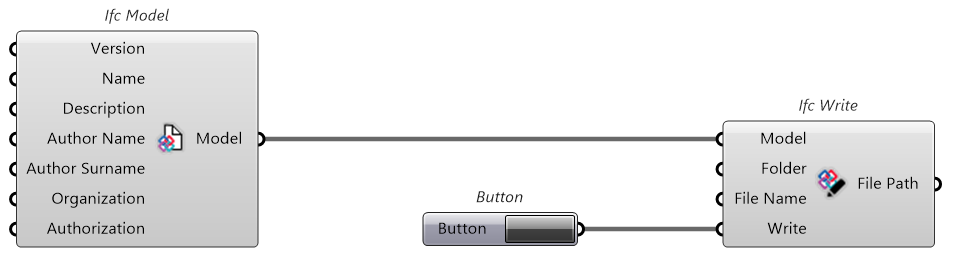
The output file will look like the following. Note that we have an header and a footer part. The rest of the model will be writtent in between.
ISO-10303-21;
HEADER;
FILE_DESCRIPTION(('ViewDefinition [CoordinationViewV2.0]'),'2;1');
FILE_NAME('Hopper Model','2026-02-11 09:05:35',('... ...'),('...'),'ifcopenshell 0.8.3','IfcHopperShell 0.1.1','...');
FILE_SCHEMA(('IFC4'));
ENDSEC;
DATA;

ENDSEC;
END-ISO-10303-21;
Project
Each IFC file must contain one (and only one) project.

Notice that the Model input/output is present in all component inputs and outputs. This is beacus we are working with a nodal workflow, so each component stores it own version of the model that contains what is added by the component, plus all that has been added by the components before it in the node tree.
If you want, you can try to use the Ifc Write component using as Model input the Model outputs of the varius components in the node tree and look it up yourself.
Of course if you create multiple branches, each one will follow its own history, not affected by the others.
If you inspect the output file, you can see the IFCPROJECT named "Hopper Project" (the plugin also sets up units matching what is set in Rhino). You can also see that the new information has been added in between the header and footer.
ISO-10303-21;
HEADER;
FILE_DESCRIPTION(('ViewDefinition [CoordinationViewV2.0]'),'2;1');
FILE_NAME('Hopper Model','2026-02-11 09:05:35',('... ...'),('...'),'ifcopenshell 0.8.3','IfcHopperShell 0.1.1','...');
FILE_SCHEMA(('IFC4'));
ENDSEC;
DATA;

#1=IFCSIUNIT(*,.LENGTHUNIT.,$,.METRE.);
#2=IFCSIUNIT(*,.AREAUNIT.,$,.SQUARE_METRE.);
#3=IFCSIUNIT(*,.VOLUMEUNIT.,$,.CUBIC_METRE.);
#4=IFCPROJECT('2dWV0r39f08fzvbQ0_6qBQ',$,'Hopper Project',$,$,$,$,(#12),#5);
#5=IFCUNITASSIGNMENT((#1,#2,#3));

ENDSEC;
END-ISO-10303-21;
Site
The next step down the IFC spatial hierarchy is the site.
Note that the site requires a Relating Object Id input. This is the step id of the project (4 in this case). You can either specify this manually, or get it from the Ifc Project component output.

Notice that we get an IFCSITE element called "Hopper Site" and an IFCRELAGGREGATES element which specifies that elment 4 (the project) aggregates element 6 (the site)
In IFC STEP relationships are handled with special elements that define how the elements are related. This approch is different from what you may be used in xml or json type syntax, where relationships are often handled with physical nesting.
The disadvantage is that they are harder to read for a human, the advantage is that any element can be related to any other more easily, and the order of the lines does not matter.
ISO-10303-21;
HEADER;
FILE_DESCRIPTION(('ViewDefinition [CoordinationViewV2.0]'),'2;1');
FILE_NAME('Hopper Model','2026-02-10 09:37:00',('... ...'),('...'),'ifcopenshell 0.8.3','IfcHopperShell 0.1.1','...');
FILE_SCHEMA(('IFC4'));
ENDSEC;
DATA;

#1=IFCSIUNIT(*,.LENGTHUNIT.,$,.METRE.);
#2=IFCSIUNIT(*,.AREAUNIT.,$,.SQUARE_METRE.);
#3=IFCSIUNIT(*,.VOLUMEUNIT.,$,.CUBIC_METRE.);
#4=IFCPROJECT('2dWV0r39f08fzvbQ0_6qBQ',$,'Hopper Project',$,$,$,$,(#12),#5);
#5=IFCUNITASSIGNMENT((#1,#2,#3));

#6=IFCSITE('0yIGGoSG1F4PForR4jYRVx',$,'Hopper Site',$,$,$,$,$,$,$,$,$,$,$);
#7=IFCRELAGGREGATES('3LsTTsmGL31f3$pFqg5eUm',$,$,$,#4,(#6));

ENDSEC;
END-ISO-10303-21;
Context
Next let's add a context (and subcontext), that tells the IFC what kind of content to expect. The context specifies if this is a 3d (Model context) or 2d model (Plan context). The subcontext further specifies the target identifier (body, box, axis, profile, footprint, clearance, annotation) and view (model, plan, elevation, section, graph, sketch).

The Ifc Context component can be placed in any location in the node tree (after the projct node), as long as it's before any component that requires it as input.
You can see that a set of axis is set up, and the context and subcontext are created.
ISO-10303-21;
HEADER;
FILE_DESCRIPTION(('ViewDefinition [CoordinationViewV2.0]'),'2;1');
FILE_NAME('Hopper Model','2026-02-10 09:37:00',('... ...'),('...'),'ifcopenshell 0.8.3','IfcHopperShell 0.1.1','...');
FILE_SCHEMA(('IFC4'));
ENDSEC;
DATA;

#1=IFCSIUNIT(*,.LENGTHUNIT.,$,.METRE.);
#2=IFCSIUNIT(*,.AREAUNIT.,$,.SQUARE_METRE.);
#3=IFCSIUNIT(*,.VOLUMEUNIT.,$,.CUBIC_METRE.);
#4=IFCPROJECT('2dWV0r39f08fzvbQ0_6qBQ',$,'Hopper Project',$,$,$,$,(#12),#5);
#5=IFCUNITASSIGNMENT((#1,#2,#3));

#6=IFCSITE('0yIGGoSG1F4PForR4jYRVx',$,'Hopper Site',$,$,$,$,$,$,$,$,$,$,$);
#7=IFCRELAGGREGATES('3LsTTsmGL31f3$pFqg5eUm',$,$,$,#4,(#6));

#8=IFCCARTESIANPOINT((0.,0.,0.));
#9=IFCDIRECTION((0.,0.,1.));
#10=IFCDIRECTION((1.,0.,0.));
#11=IFCAXIS2PLACEMENT3D(#8,#9,#10);
#12=IFCGEOMETRICREPRESENTATIONCONTEXT($,'Model',3,1.E-05,#11,$);
#13=IFCGEOMETRICREPRESENTATIONSUBCONTEXT('Body','Model',*,*,*,*,#12,$,.MODEL_VIEW.,$);

ENDSEC;
END-ISO-10303-21;
Building
We can now add an Ifc Building to our site.
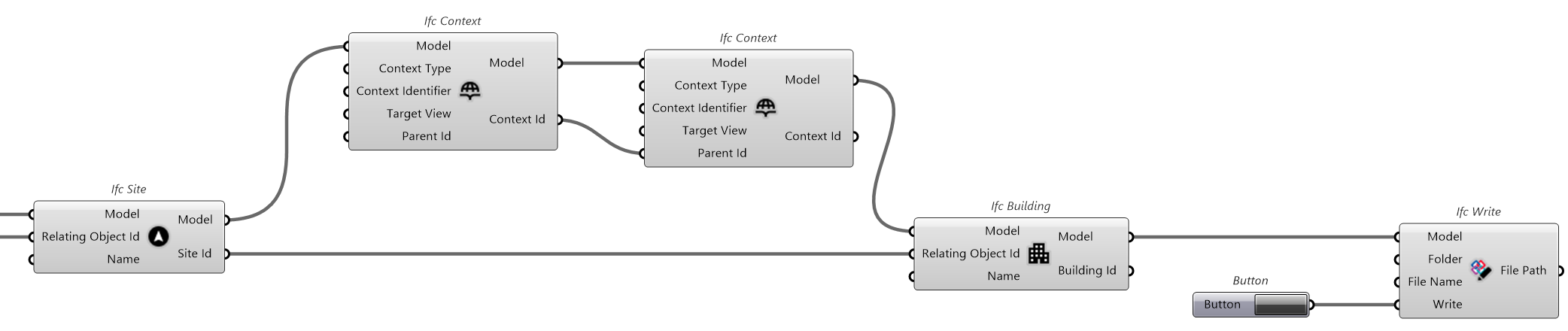
The building is added to the site with the same relationship that we used between the site and the project.
ISO-10303-21;
HEADER;
FILE_DESCRIPTION(('ViewDefinition [CoordinationViewV2.0]'),'2;1');
FILE_NAME('Hopper Model','2026-02-10 09:37:00',('... ...'),('...'),'ifcopenshell 0.8.3','IfcHopperShell 0.1.1','...');
FILE_SCHEMA(('IFC4'));
ENDSEC;
DATA;

#1=IFCSIUNIT(*,.LENGTHUNIT.,$,.METRE.);
#2=IFCSIUNIT(*,.AREAUNIT.,$,.SQUARE_METRE.);
#3=IFCSIUNIT(*,.VOLUMEUNIT.,$,.CUBIC_METRE.);
#4=IFCPROJECT('2dWV0r39f08fzvbQ0_6qBQ',$,'Hopper Project',$,$,$,$,(#12),#5);
#5=IFCUNITASSIGNMENT((#1,#2,#3));

#6=IFCSITE('0yIGGoSG1F4PForR4jYRVx',$,'Hopper Site',$,$,$,$,$,$,$,$,$,$,$);
#7=IFCRELAGGREGATES('3LsTTsmGL31f3$pFqg5eUm',$,$,$,#4,(#6));

#8=IFCCARTESIANPOINT((0.,0.,0.));
#9=IFCDIRECTION((0.,0.,1.));
#10=IFCDIRECTION((1.,0.,0.));
#11=IFCAXIS2PLACEMENT3D(#8,#9,#10);
#12=IFCGEOMETRICREPRESENTATIONCONTEXT($,'Model',3,1.E-05,#11,$);
#13=IFCGEOMETRICREPRESENTATIONSUBCONTEXT('Body','Model',*,*,*,*,#12,$,.MODEL_VIEW.,$);

#14=IFCBUILDING('2Mr5y2lVD3GBNHwvWNh6GH',$,'Hopper Building',$,$,$,$,$,$,$,$,$);
#15=IFCRELAGGREGATES('2_vsbr5$97O8LjT$jcwGVF',$,$,$,#6,(#14));

ENDSEC;
END-ISO-10303-21;
Building storey
The same again for Ifc Building Storey. In this case we want to create two storeys, so we provide a list of two names as input, to get two storeys as output.
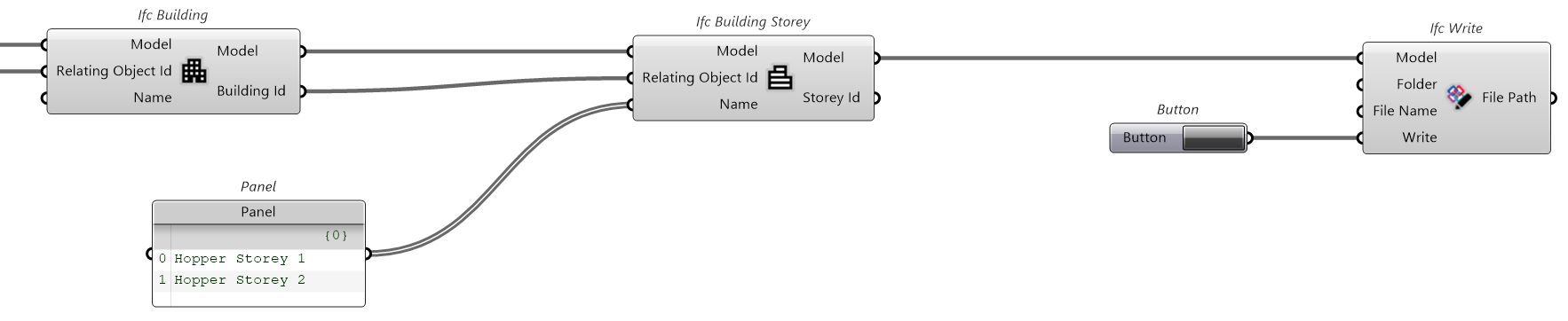
You can see that two building storeys have been added, and they were aggregated to the building.
ISO-10303-21;
HEADER;
FILE_DESCRIPTION(('ViewDefinition [CoordinationViewV2.0]'),'2;1');
FILE_NAME('Hopper Model','2026-02-10 09:37:00',('... ...'),('...'),'ifcopenshell 0.8.3','IfcHopperShell 0.1.1','...');
FILE_SCHEMA(('IFC4'));
ENDSEC;
DATA;

#1=IFCSIUNIT(*,.LENGTHUNIT.,$,.METRE.);
#2=IFCSIUNIT(*,.AREAUNIT.,$,.SQUARE_METRE.);
#3=IFCSIUNIT(*,.VOLUMEUNIT.,$,.CUBIC_METRE.);
#4=IFCPROJECT('2dWV0r39f08fzvbQ0_6qBQ',$,'Hopper Project',$,$,$,$,(#12),#5);
#5=IFCUNITASSIGNMENT((#1,#2,#3));

#6=IFCSITE('0yIGGoSG1F4PForR4jYRVx',$,'Hopper Site',$,$,$,$,$,$,$,$,$,$,$);
#7=IFCRELAGGREGATES('3LsTTsmGL31f3$pFqg5eUm',$,$,$,#4,(#6));

#8=IFCCARTESIANPOINT((0.,0.,0.));
#9=IFCDIRECTION((0.,0.,1.));
#10=IFCDIRECTION((1.,0.,0.));
#11=IFCAXIS2PLACEMENT3D(#8,#9,#10);
#12=IFCGEOMETRICREPRESENTATIONCONTEXT($,'Model',3,1.E-05,#11,$);
#13=IFCGEOMETRICREPRESENTATIONSUBCONTEXT('Body','Model',*,*,*,*,#12,$,.MODEL_VIEW.,$);

#14=IFCBUILDING('2Mr5y2lVD3GBNHwvWNh6GH',$,'Hopper Building',$,$,$,$,$,$,$,$,$);
#15=IFCRELAGGREGATES('2_vsbr5$97O8LjT$jcwGVF',$,$,$,#6,(#14));

#16=IFCBUILDINGSTOREY('354roRFPnCxO7o8Kdyl24m',$,'Hopper Storey 1',$,$,$,$,$,$,$);
#17=IFCRELAGGREGATES('1wC4$jEKTCgeMgVV1TEuHN',$,$,$,#14,(#18,#16));
#18=IFCBUILDINGSTOREY('1fyv64jjz3OxT8cFVY40ZU',$,'Hopper Storey 2',$,$,$,$,$,$,$);

ENDSEC;
END-ISO-10303-21;
Style
We can prepare a style that will be used to color our objects.

A style basically defines a surface rgb color.
ISO-10303-21;
HEADER;
FILE_DESCRIPTION(('ViewDefinition [CoordinationViewV2.0]'),'2;1');
FILE_NAME('Hopper Model','2026-02-10 09:37:00',('... ...'),('...'),'ifcopenshell 0.8.3','IfcHopperShell 0.1.1','...');
FILE_SCHEMA(('IFC4'));
ENDSEC;
DATA;

#1=IFCSIUNIT(*,.LENGTHUNIT.,$,.METRE.);
#2=IFCSIUNIT(*,.AREAUNIT.,$,.SQUARE_METRE.);
#3=IFCSIUNIT(*,.VOLUMEUNIT.,$,.CUBIC_METRE.);
#4=IFCPROJECT('2dWV0r39f08fzvbQ0_6qBQ',$,'Hopper Project',$,$,$,$,(#12),#5);
#5=IFCUNITASSIGNMENT((#1,#2,#3));

#6=IFCSITE('0yIGGoSG1F4PForR4jYRVx',$,'Hopper Site',$,$,$,$,$,$,$,$,$,$,$);
#7=IFCRELAGGREGATES('3LsTTsmGL31f3$pFqg5eUm',$,$,$,#4,(#6));

#8=IFCCARTESIANPOINT((0.,0.,0.));
#9=IFCDIRECTION((0.,0.,1.));
#10=IFCDIRECTION((1.,0.,0.));
#11=IFCAXIS2PLACEMENT3D(#8,#9,#10);
#12=IFCGEOMETRICREPRESENTATIONCONTEXT($,'Model',3,1.E-05,#11,$);
#13=IFCGEOMETRICREPRESENTATIONSUBCONTEXT('Body','Model',*,*,*,*,#12,$,.MODEL_VIEW.,$);

#14=IFCBUILDING('2Mr5y2lVD3GBNHwvWNh6GH',$,'Hopper Building',$,$,$,$,$,$,$,$,$);
#15=IFCRELAGGREGATES('2_vsbr5$97O8LjT$jcwGVF',$,$,$,#6,(#14));

#16=IFCBUILDINGSTOREY('354roRFPnCxO7o8Kdyl24m',$,'Hopper Storey 1',$,$,$,$,$,$,$);
#17=IFCRELAGGREGATES('1wC4$jEKTCgeMgVV1TEuHN',$,$,$,#14,(#18,#16));
#18=IFCBUILDINGSTOREY('1fyv64jjz3OxT8cFVY40ZU',$,'Hopper Storey 2',$,$,$,$,$,$,$);

#19=IFCSURFACESTYLE($,.BOTH.,(#20));
#20=IFCSURFACESTYLESHADING(#21,0.);
#21=IFCCOLOURRGB('Hopper Style',0.490196078431373,0.788235294117647,0.188235294117647);

ENDSEC;
END-ISO-10303-21;
Object
It's time to add an actual object to our spatial hierarchy. This plugin consider objects anything you want to add to the spatial hierachy. By default it assumes a IFCBUILDINGELEMENTPROXY, but you can specify the class you like.
Note that an object can esist even without geometry assigned to it, cause you may need it to assign Psets and Qtos.
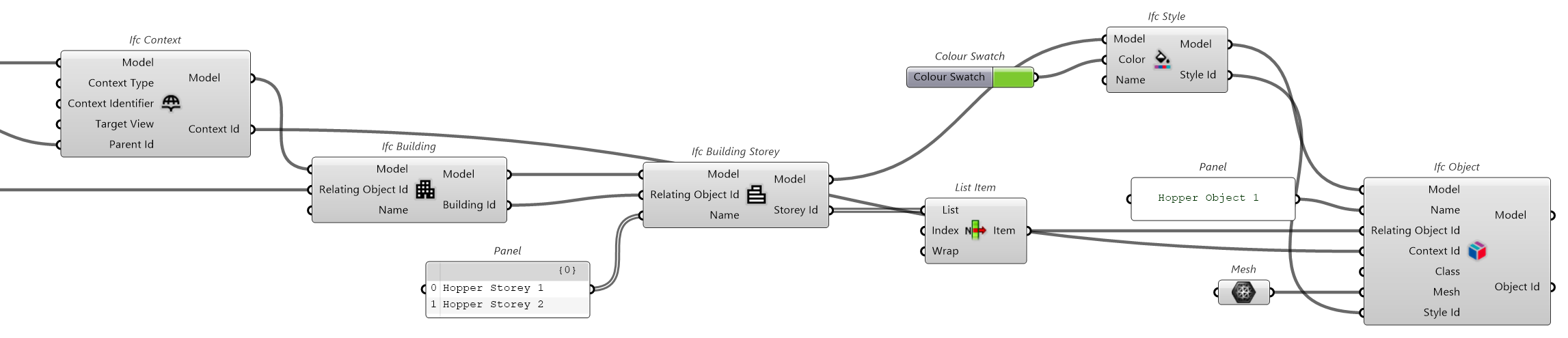
You can see the pbject is defined, aggregated to the building storey, positioned in a certain location with local placement, and assigned a style.
ISO-10303-21;
HEADER;
FILE_DESCRIPTION(('ViewDefinition [CoordinationViewV2.0]'),'2;1');
FILE_NAME('Hopper Model','2026-02-10 09:37:00',('... ...'),('...'),'ifcopenshell 0.8.3','IfcHopperShell 0.1.1','...');
FILE_SCHEMA(('IFC4'));
ENDSEC;
DATA;

#1=IFCSIUNIT(*,.LENGTHUNIT.,$,.METRE.);
#2=IFCSIUNIT(*,.AREAUNIT.,$,.SQUARE_METRE.);
#3=IFCSIUNIT(*,.VOLUMEUNIT.,$,.CUBIC_METRE.);
#4=IFCPROJECT('2dWV0r39f08fzvbQ0_6qBQ',$,'Hopper Project',$,$,$,$,(#12),#5);
#5=IFCUNITASSIGNMENT((#1,#2,#3));

#6=IFCSITE('0yIGGoSG1F4PForR4jYRVx',$,'Hopper Site',$,$,$,$,$,$,$,$,$,$,$);
#7=IFCRELAGGREGATES('3LsTTsmGL31f3$pFqg5eUm',$,$,$,#4,(#6));

#8=IFCCARTESIANPOINT((0.,0.,0.));
#9=IFCDIRECTION((0.,0.,1.));
#10=IFCDIRECTION((1.,0.,0.));
#11=IFCAXIS2PLACEMENT3D(#8,#9,#10);
#12=IFCGEOMETRICREPRESENTATIONCONTEXT($,'Model',3,1.E-05,#11,$);
#13=IFCGEOMETRICREPRESENTATIONSUBCONTEXT('Body','Model',*,*,*,*,#12,$,.MODEL_VIEW.,$);

#14=IFCBUILDING('2Mr5y2lVD3GBNHwvWNh6GH',$,'Hopper Building',$,$,$,$,$,$,$,$,$);
#15=IFCRELAGGREGATES('2_vsbr5$97O8LjT$jcwGVF',$,$,$,#6,(#14));

#16=IFCBUILDINGSTOREY('354roRFPnCxO7o8Kdyl24m',$,'Hopper Storey 1',$,$,$,$,$,$,$);
#17=IFCRELAGGREGATES('1wC4$jEKTCgeMgVV1TEuHN',$,$,$,#14,(#18,#16));
#18=IFCBUILDINGSTOREY('1fyv64jjz3OxT8cFVY40ZU',$,'Hopper Storey 2',$,$,$,$,$,$,$);

#19=IFCSURFACESTYLE($,.BOTH.,(#20));
#20=IFCSURFACESTYLESHADING(#21,0.);
#21=IFCCOLOURRGB('Hopper Style',0.490196078431373,0.788235294117647,0.188235294117647);

#22=IFCBUILDINGELEMENTPROXY('2R$np$cxT4ovwAl2q4f21_',$,'Hopper Object 1',$,$,#33,#537,$,$);
#28=IFCRELAGGREGATES('018otWDGr2ExkcsLzKN11$',$,$,$,#16,(#22));
#29=IFCCARTESIANPOINT((0.,0.,0.));
#30=IFCDIRECTION((0.,0.,1.));
#31=IFCDIRECTION((1.,0.,0.));
#32=IFCAXIS2PLACEMENT3D(#29,#30,#31);
#33=IFCLOCALPLACEMENT($,#32);

#34=IFCCARTESIANPOINTLIST3D(((0.46875,-0.7578125,0.2421875),(0.4375,-0.765625,0.1640625),[...],(-0.640625,0.4296875,-0.0078125)));
#35=IFCINDEXEDPOLYGONALFACE((1,2,3,4));
#36=IFCINDEXEDPOLYGONALFACE((5,6,7,8));
[...]
#534=IFCINDEXEDPOLYGONALFACE((532,555,460,439));
#535=IFCPOLYGONALFACESET(#34,$,(#35,#36,[...],#534),$);
#536=IFCSHAPEREPRESENTATION(#13,'Body','Tessellation',(#535));
#537=IFCPRODUCTDEFINITIONSHAPE($,$,(#536));
#538=IFCSTYLEDITEM(#535,(#19),$);

ENDSEC;
END-ISO-10303-21;
Property Set
We can now add a Pset to our object.
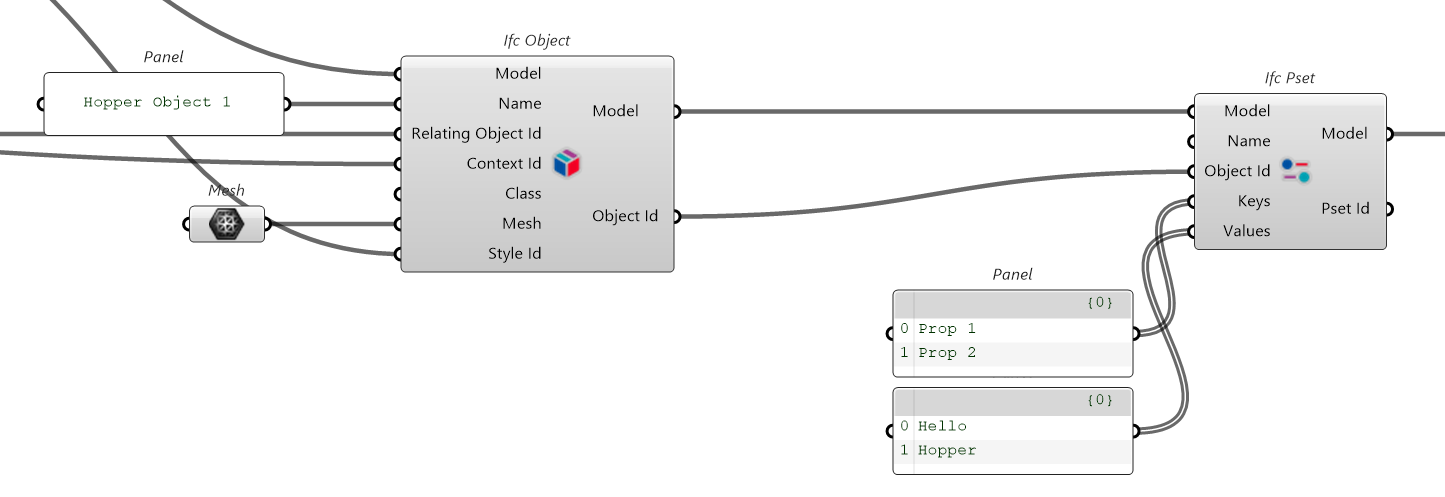
A Pset is a collection of properties. Properties are key, value pairs.
ISO-10303-21;
HEADER;
FILE_DESCRIPTION(('ViewDefinition [CoordinationViewV2.0]'),'2;1');
FILE_NAME('Hopper Model','2026-02-10 09:37:00',('... ...'),('...'),'ifcopenshell 0.8.3','IfcHopperShell 0.1.1','...');
FILE_SCHEMA(('IFC4'));
ENDSEC;
DATA;

#1=IFCSIUNIT(*,.LENGTHUNIT.,$,.METRE.);
#2=IFCSIUNIT(*,.AREAUNIT.,$,.SQUARE_METRE.);
#3=IFCSIUNIT(*,.VOLUMEUNIT.,$,.CUBIC_METRE.);
#4=IFCPROJECT('2dWV0r39f08fzvbQ0_6qBQ',$,'Hopper Project',$,$,$,$,(#12),#5);
#5=IFCUNITASSIGNMENT((#1,#2,#3));

#6=IFCSITE('0yIGGoSG1F4PForR4jYRVx',$,'Hopper Site',$,$,$,$,$,$,$,$,$,$,$);
#7=IFCRELAGGREGATES('3LsTTsmGL31f3$pFqg5eUm',$,$,$,#4,(#6));

#8=IFCCARTESIANPOINT((0.,0.,0.));
#9=IFCDIRECTION((0.,0.,1.));
#10=IFCDIRECTION((1.,0.,0.));
#11=IFCAXIS2PLACEMENT3D(#8,#9,#10);
#12=IFCGEOMETRICREPRESENTATIONCONTEXT($,'Model',3,1.E-05,#11,$);
#13=IFCGEOMETRICREPRESENTATIONSUBCONTEXT('Body','Model',*,*,*,*,#12,$,.MODEL_VIEW.,$);

#14=IFCBUILDING('2Mr5y2lVD3GBNHwvWNh6GH',$,'Hopper Building',$,$,$,$,$,$,$,$,$);
#15=IFCRELAGGREGATES('2_vsbr5$97O8LjT$jcwGVF',$,$,$,#6,(#14));

#16=IFCBUILDINGSTOREY('354roRFPnCxO7o8Kdyl24m',$,'Hopper Storey 1',$,$,$,$,$,$,$);
#17=IFCRELAGGREGATES('1wC4$jEKTCgeMgVV1TEuHN',$,$,$,#14,(#18,#16));
#18=IFCBUILDINGSTOREY('1fyv64jjz3OxT8cFVY40ZU',$,'Hopper Storey 2',$,$,$,$,$,$,$);

#19=IFCSURFACESTYLE($,.BOTH.,(#20));
#20=IFCSURFACESTYLESHADING(#21,0.);
#21=IFCCOLOURRGB('Hopper Style',0.490196078431373,0.788235294117647,0.188235294117647);

#22=IFCBUILDINGELEMENTPROXY('2R$np$cxT4ovwAl2q4f21_',$,'Hopper Object 1',$,$,#33,#537,$,$);
#28=IFCRELAGGREGATES('018otWDGr2ExkcsLzKN11$',$,$,$,#16,(#22));
#29=IFCCARTESIANPOINT((0.,0.,0.));
#30=IFCDIRECTION((0.,0.,1.));
#31=IFCDIRECTION((1.,0.,0.));
#32=IFCAXIS2PLACEMENT3D(#29,#30,#31);
#33=IFCLOCALPLACEMENT($,#32);

#34=IFCCARTESIANPOINTLIST3D(((0.46875,-0.7578125,0.2421875),(0.4375,-0.765625,0.1640625),[...],(-0.640625,0.4296875,-0.0078125)));
#35=IFCINDEXEDPOLYGONALFACE((1,2,3,4));
#36=IFCINDEXEDPOLYGONALFACE((5,6,7,8));
[...]
#534=IFCINDEXEDPOLYGONALFACE((532,555,460,439));
#535=IFCPOLYGONALFACESET(#34,$,(#35,#36,[...],#534),$);
#536=IFCSHAPEREPRESENTATION(#13,'Body','Tessellation',(#535));
#537=IFCPRODUCTDEFINITIONSHAPE($,$,(#536));
#538=IFCSTYLEDITEM(#535,(#19),$);

#539=IFCPROPERTYSET('1Df9zcTCTFjQXTHCVJtxXJ',$,'Hopper Pset',$,(#541,#542));
#540=IFCRELDEFINESBYPROPERTIES('2TPgptDKvCI8P5O9331kNI',$,$,$,(#22),#539);
#541=IFCPROPERTYSINGLEVALUE('Prop 1',$,IFCLABEL('Hello'),$);
#542=IFCPROPERTYSINGLEVALUE('Prop 2',$,IFCLABEL('Hopper'),$);

ENDSEC;
END-ISO-10303-21;
Quantity Set
We can now add a Qto to our object.
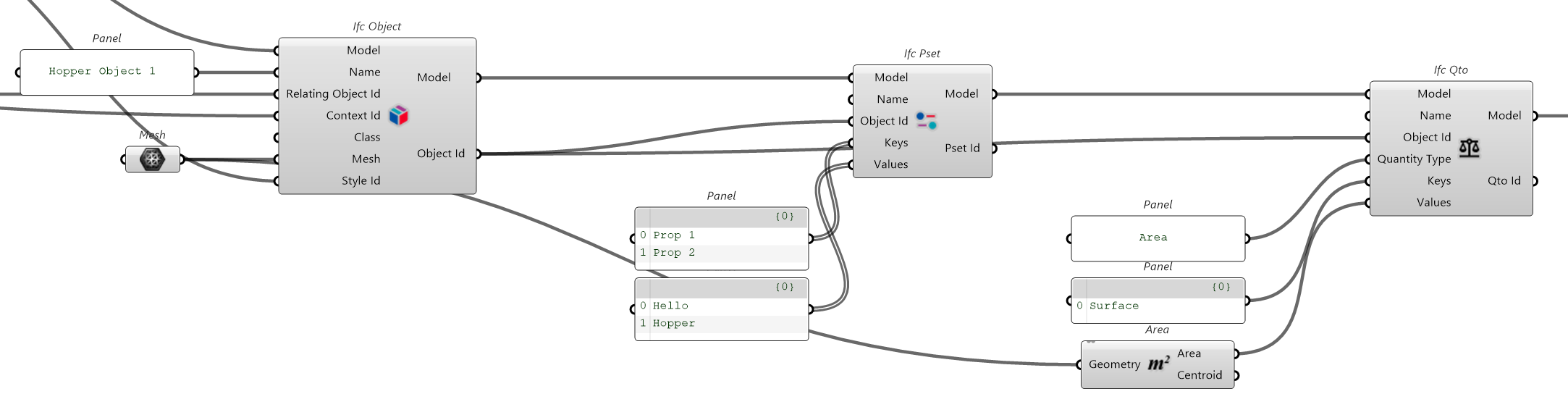
A Qto is a collection of quantities. Quantities are key, value pairs with a measurement unit.
ISO-10303-21;
HEADER;
FILE_DESCRIPTION(('ViewDefinition [CoordinationViewV2.0]'),'2;1');
FILE_NAME('Hopper Model','2026-02-10 09:37:00',('... ...'),('...'),'ifcopenshell 0.8.3','IfcHopperShell 0.1.1','...');
FILE_SCHEMA(('IFC4'));
ENDSEC;
DATA;

#1=IFCSIUNIT(*,.LENGTHUNIT.,$,.METRE.);
#2=IFCSIUNIT(*,.AREAUNIT.,$,.SQUARE_METRE.);
#3=IFCSIUNIT(*,.VOLUMEUNIT.,$,.CUBIC_METRE.);
#4=IFCPROJECT('2dWV0r39f08fzvbQ0_6qBQ',$,'Hopper Project',$,$,$,$,(#12),#5);
#5=IFCUNITASSIGNMENT((#1,#2,#3));

#6=IFCSITE('0yIGGoSG1F4PForR4jYRVx',$,'Hopper Site',$,$,$,$,$,$,$,$,$,$,$);
#7=IFCRELAGGREGATES('3LsTTsmGL31f3$pFqg5eUm',$,$,$,#4,(#6));

#8=IFCCARTESIANPOINT((0.,0.,0.));
#9=IFCDIRECTION((0.,0.,1.));
#10=IFCDIRECTION((1.,0.,0.));
#11=IFCAXIS2PLACEMENT3D(#8,#9,#10);
#12=IFCGEOMETRICREPRESENTATIONCONTEXT($,'Model',3,1.E-05,#11,$);
#13=IFCGEOMETRICREPRESENTATIONSUBCONTEXT('Body','Model',*,*,*,*,#12,$,.MODEL_VIEW.,$);

#14=IFCBUILDING('2Mr5y2lVD3GBNHwvWNh6GH',$,'Hopper Building',$,$,$,$,$,$,$,$,$);
#15=IFCRELAGGREGATES('2_vsbr5$97O8LjT$jcwGVF',$,$,$,#6,(#14));

#16=IFCBUILDINGSTOREY('354roRFPnCxO7o8Kdyl24m',$,'Hopper Storey 1',$,$,$,$,$,$,$);
#17=IFCRELAGGREGATES('1wC4$jEKTCgeMgVV1TEuHN',$,$,$,#14,(#18,#16));
#18=IFCBUILDINGSTOREY('1fyv64jjz3OxT8cFVY40ZU',$,'Hopper Storey 2',$,$,$,$,$,$,$);

#19=IFCSURFACESTYLE($,.BOTH.,(#20));
#20=IFCSURFACESTYLESHADING(#21,0.);
#21=IFCCOLOURRGB('Hopper Style',0.490196078431373,0.788235294117647,0.188235294117647);

#22=IFCBUILDINGELEMENTPROXY('2R$np$cxT4ovwAl2q4f21_',$,'Hopper Object 1',$,$,#33,#537,$,$);
#28=IFCRELAGGREGATES('018otWDGr2ExkcsLzKN11$',$,$,$,#16,(#22));
#29=IFCCARTESIANPOINT((0.,0.,0.));
#30=IFCDIRECTION((0.,0.,1.));
#31=IFCDIRECTION((1.,0.,0.));
#32=IFCAXIS2PLACEMENT3D(#29,#30,#31);
#33=IFCLOCALPLACEMENT($,#32);

#34=IFCCARTESIANPOINTLIST3D(((0.46875,-0.7578125,0.2421875),(0.4375,-0.765625,0.1640625),[...],(-0.640625,0.4296875,-0.0078125)));
#35=IFCINDEXEDPOLYGONALFACE((1,2,3,4));
#36=IFCINDEXEDPOLYGONALFACE((5,6,7,8));
[...]
#534=IFCINDEXEDPOLYGONALFACE((532,555,460,439));
#535=IFCPOLYGONALFACESET(#34,$,(#35,#36,[...],#534),$);
#536=IFCSHAPEREPRESENTATION(#13,'Body','Tessellation',(#535));
#537=IFCPRODUCTDEFINITIONSHAPE($,$,(#536));
#538=IFCSTYLEDITEM(#535,(#19),$);

#539=IFCPROPERTYSET('1Df9zcTCTFjQXTHCVJtxXJ',$,'Hopper Pset',$,(#541,#542));
#540=IFCRELDEFINESBYPROPERTIES('2TPgptDKvCI8P5O9331kNI',$,$,$,(#22),#539);
#541=IFCPROPERTYSINGLEVALUE('Prop 1',$,IFCLABEL('Hello'),$);
#542=IFCPROPERTYSINGLEVALUE('Prop 2',$,IFCLABEL('Hopper'),$);

#543=IFCELEMENTQUANTITY('0wb6wTOeb8WfDJFwkDNSR7',$,'Hopper Qto',$,$,(#545));
#544=IFCRELDEFINESBYPROPERTIES('1FXmQSmpL7LRGlXLu273Qt',$,$,$,(#22),#543);
#545=IFCQUANTITYAREA('Surface',$,$,12.4241885607358,$);

ENDSEC;
END-ISO-10303-21;